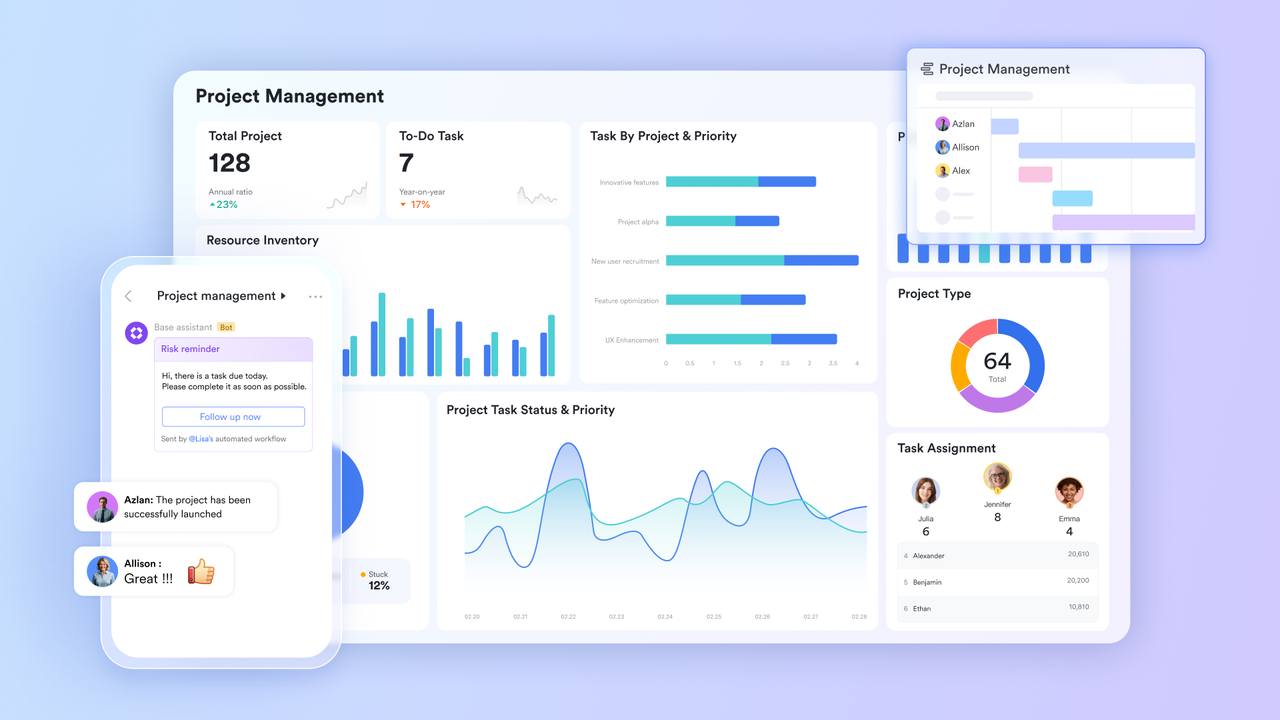
The benchmark for a high-performing team isn’t just the quality of their work, but the speed and fluidity of their digital operations. As the workplace becomes increasingly decentralized and data-heavy, the “productivity gap” between teams using fragmented tools and those using a synchronized environment is widening.
To stay ahead, organizations are moving away from the “app for everything” model and toward unified project management tools. By consolidating your workflow, you ensure that every task, conversation, and document lives in a single, searchable home. Here is a look at the essential features your team should consider to eliminate friction and maximize output this year.
Lark works as a project management tool
High-context collaboration with Lark Docs
As the volume of information increases, static documents become a liability. Modern teams need a “living” canvas that integrates multiple streams of information into one view.
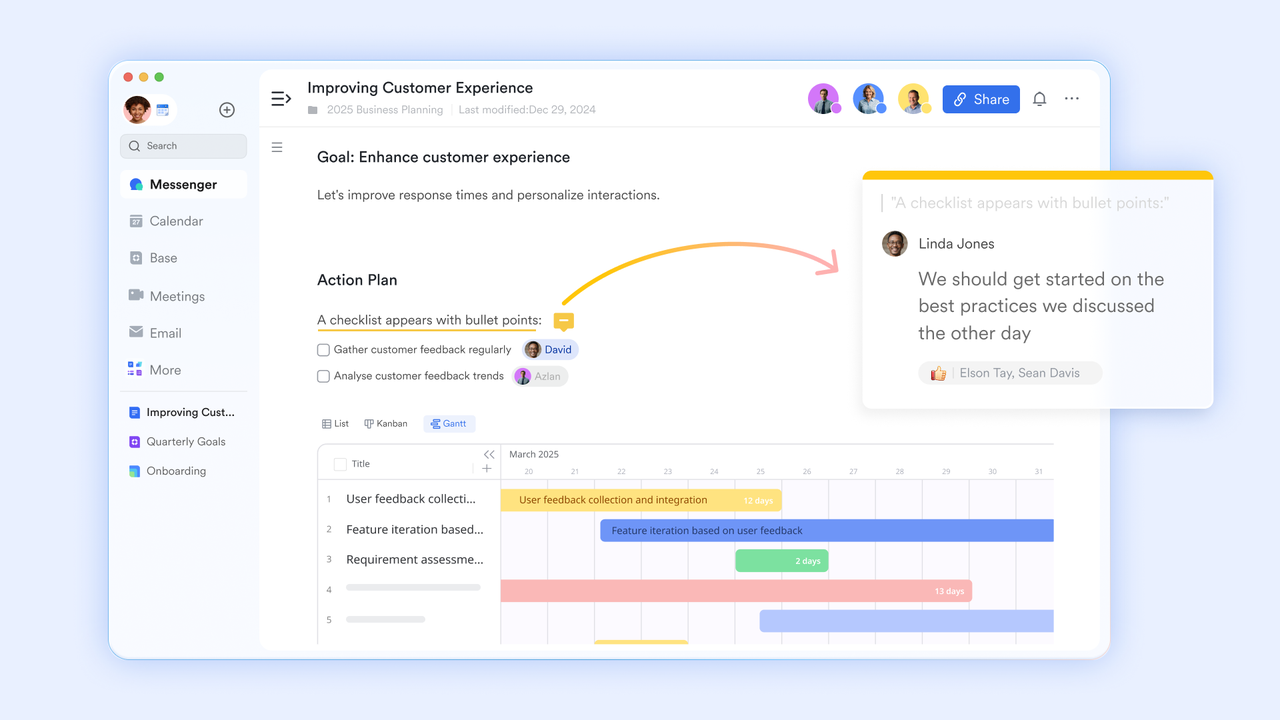
Lark Docs
- Multi-modal embedding. This feature allows you to embed live “Smart Blocks” into a document, such as a countdown timer for a launch, a live sheet from a database, or a playable video file.
- Productivity impact: It eliminates “Tab Fatigue.” Instead of having five browser tabs open to view a project’s status, a manager sees the live budget, the latest brief, and the team’s feedback all within a single doc.
- Example: A product team creates a “Launch Headquarters” in a doc, embedding a live Lark Base view of the bug tracker and a Lark Calendar widget for the release schedule, ensuring no one has to leave the page to stay updated.
Intelligent meeting management with Lark Minutes
Meetings are often the most expensive—and least documented—part of a workday. Turning spoken words into searchable data is a requirement for modern accountability.
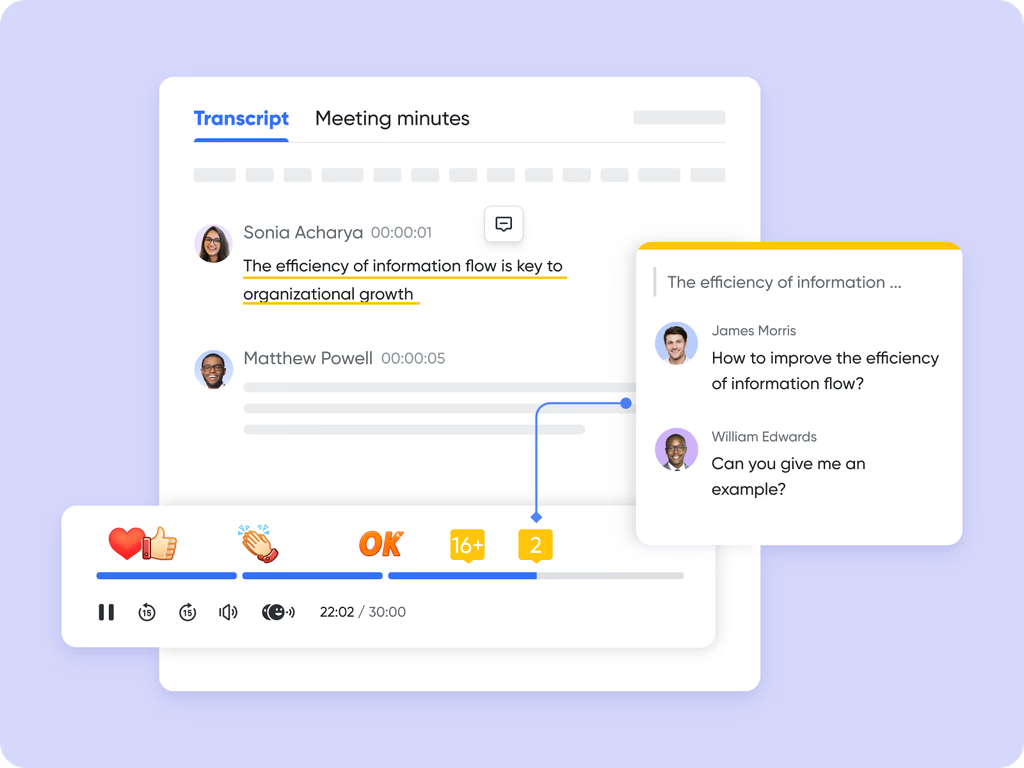
Lark Minutes
- AI-powered speaker identification. The system records video calls and generates a transcript that automatically attributes text to the correct participant, even in crowded meetings.
- Productivity impact: Supports “Asynchronous Progress.” Team members in conflicting time zones can skip the live meeting and use the “Keyword Search” to jump straight to the parts of the transcript where their specific department was discussed.
- Example: Global firms find that having native, high-fidelity transcription for every call saves thousands annually on third-party recording services and manual note-taking.
Automated external operations with Lark Mail
External communication is usually the last silo to be broken. Bringing your inbox into your workspace ensures that client data isn’t trapped in a “private” environment.
- Email-to-chat conversion. This allows you to take an incoming external email and instantly share it into a specific internal group chat for collaborative drafting.
- Productivity impact: Removes the “Forwarding Lag.” Instead of a chain of ten “FYI” emails, the whole team sees the client’s request in Messenger and can discuss the solution in real-time before replying.
- Example: A Sales Lead receives a complex technical question via email; they share it into the “Engineering Support” group chat. The engineers provide the answer in seconds, and the salesperson replies to the client without ever switching apps.
Logic-based Intake with Lark Forms
Messy, unstructured data is a primary cause of administrative overhead. Professional teams use standardized intake methods to ensure every request is actionable from the second it arrives.
- Conditional logic branching. You can design forms that change their questions based on previous answers, ensuring users only fill out what is relevant to their specific request.
- Productivity impact: Eliminates “Chasing Waste.” Because the form mandates the correct information (like attaching a receipt or choosing a department), the administrative team never has to go back to the user to ask for missing details.
- Example: An HR team uses a Form for “Hardware Requests.” If a user selects “Remote,” the form automatically triggers a field for a shipping address; if they select “Office,” it asks for a desk number, feeding that data directly into a Lark Approval flow.
Standardized knowledge with Lark Wiki
Institutional memory is a company’s most valuable asset, but it’s often buried in personal folders. A centralized wiki ensures that “Standard Operating Procedures” (SOPs) are a shared resource.
- Permission inheritance. This allows admins to set access levels at the folder level, so as you hire more people, they automatically gain access to the right guides based on their department.
- Productivity impact: Reduces “Onboarding Drag.” New hires can self-serve their training by following “Learning Paths” in the Wiki, freeing up senior leads from repetitive training sessions.
- Example: A tech company uses the Wiki to host its “Developer Playbook,” ensuring that the London and Singapore offices are always coding to the same global standards.
Synchronized strategy with Lark OKR
In a fast-moving year, “busy work” is the enemy of growth. Strategic tools ensure that every minute of effort is actually moving the company toward its financial targets.
- Real-time confidence scores. Owners of a key result can update a “Confidence Level” (On Track, At Risk, or Off Track), providing an instant visual health check for the entire organization.
- Productivity impact: Eliminates “Alignment Bloat.” Instead of daily stand-ups to see if people are on track, leadership can view the OKR dashboard to see where resources need to be reallocated.
- Example: A CEO notices a “Red” confidence score on a revenue target; they click into the linked project management tools to see which specific tasks are blocked and can intervene before the month ends.
Bonus: The financial drain of the “One more app” habit
When a business wants to boost its output, the first move is often to look at Google Workspace pricing to see the cost of adding basic seats for email and file storage. It feels like a small, manageable line item. However, the real “productivity leak” starts when those basic tools can’t handle the specialized needs of a modern team. To fill the gaps, companies often start layering on extra subscriptions: $10 a month for a task tracker, $15 for a pro video tool, and another $12 for a separate knowledge base.
By the time you’ve “fixed” your workflow, you are paying for five different passwords and five different notification settings per person. This isn’t just a budget issue; it’s a mental tax. Your team ends up spending a huge chunk of their morning just “checking the apps”, looking for a client’s comment in a chat, then hunting for the related file in a folder, then updating a status on a separate board. When your information is scattered across these digital islands, your staff spends more time managing the software than doing the work that actually moves the needle.
Lark changes this by keeping your team’s chat, task databases, and video calls in one single home. Instead of juggling a dozen different bills and browser tabs, you have one clear view of your entire operation. This doesn’t just lower your monthly overhead; it clears out the digital clutter so your team can finally work at full speed without being held back by a messy, expensive pile of tools.
Conclusion
Productivity is less about individual effort and more about the “connective tissue” of your organization. Fragmented tools create friction, while a synchronized environment and a modern set of productivity tools create momentum. By consolidating your communication, data, and strategy into a single hub, you remove the administrative weight that holds most teams back. You aren’t just working faster; you are building a resilient business infrastructure where information moves as fast as the market, turning every project into a driver for business growth.
About the Author